We recognise the importance of timely assistance, so we have designed multiple ways for you to access help quickly and efficiently.
You can seek support through the following methods:
- MCE Help Centre
- Ask our Chatbot
- Raise a ticket
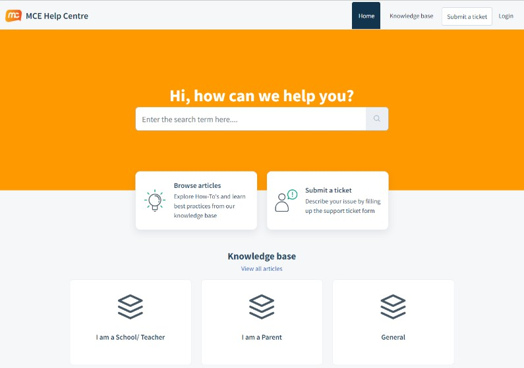
MCE Help Centre
We have carefully curated a collection of support resources to help you find answers to commonly asked questions. This section is regularly updated with new content to ensure you have access to the latest information.
To find the most relevant answer, utilize the search function, which will guide you to the most accurate solution.
Chatbot
In addition to our support resources, we strongly encourage you to use our Chatbot for instant support. By asking questions directly in the chatbot, you can receive relevant answers quickly—without the need to wait for assistance. This Chatbot tool is designed to facilitate a smoother experience and guide you efficiently through any queries you may have.
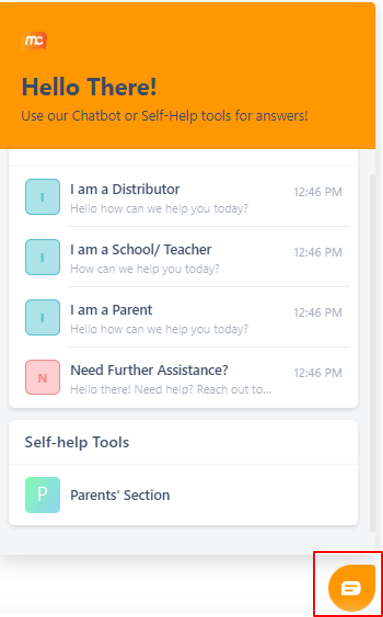
To ensure the best support experience with our Chatbot, here are some useful tips:
- Type more than one word and uses a question phrasing
- Use common keywords when asking a question
- Type in one sentence at a time - Don’t provide specific order numbers or email address
- Avoid slang and text abbreviations. i.e. How are you? rather than How R U? or hru?
Help us Learn
At the end of every article or a question to our Chatbot, we will prompt you if the article or the Chatbot has answered your question. By indicating Yes or No answer will allow our system to learn better in order to help you.
Some tips to help you when giving a Yes or No to our support resources and Chatbot:
- Share your feedback! – Was the support resources/Chatbot helpful in addressing your question? Did the response match what you were looking for?
- Keep Calm - We understand the answer may not meet your expectations, but it is accurate based on your question. For example, if you request a refund, the response explains our return policy, which may not align with your desired outcome.
- Do try to rate the helpfulness based on question to answers
Raise a Ticket
If you do not find the answers in the support resources, you can raise a ticket with us, and we will get back to you with an answer within 3-5 working days. To raise a ticket, please visit MCE Help Centre at https://mce.freshdesk.com/support/tickets/new
For customers in USA:
Call: 844-464-6411
Monday to Friday: 8:00 AM to 8:00 PM EST Saturday: 11:30 AM to 8:00 PM EST
Email: techsupport@marshallcavendish.com
For customers in other countries:
Email: helpdesk@mceducation.com
or click HERE to raise a ticket
Was this article helpful?
That’s Great!
Thank you for your feedback
Sorry! We couldn't be helpful
Thank you for your feedback
Feedback sent
We appreciate your effort and will try to fix the article