If you've forgotten your MCEduHub username, please try using your email address as the username. If you're still unable to log in, please follow the below instructions:
If you have forgotten your MCEduHub password, you can request to reset your password by following the below instructions:
Step 1: Visit MCEduHub Website
Step 2: Click on 'Forgot Password?'

Step 3. Upon clicking 'Forget Password?', the Reset Password will pop-up requesting you to key in your details. (If you've forgotten your MCEduHub username, please try entering your email address instead)
After keying in the details, click on 'Reset Password'
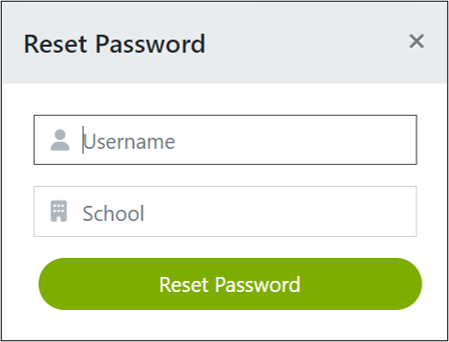
Note: If you enter your email as your Username, you do not to key in a School ID.
Was this article helpful?
That’s Great!
Thank you for your feedback
Sorry! We couldn't be helpful
Thank you for your feedback
Feedback sent
We appreciate your effort and will try to fix the article